



近期华为的鸿蒙系统(HarmonyOS)在各大平台疯狂刷屏,可谓是出尽了风头,很多小伙伴都问有没有鸿蒙相关的开发教程,那么它来了!
1、创建xml布局文件
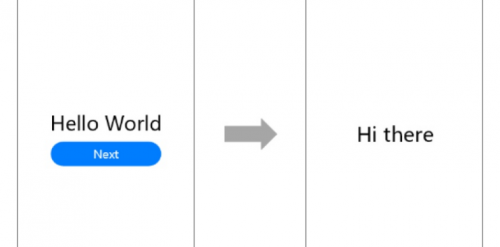
第一个页面内有一个文本和一个按钮,使用DependentLayout布局,通过Text和Button组件来实现,其中vp和fp分别表示虚拟像素和字体像素。“ability_main.xml”的示例代码如下:
<?xml version="1.0" encoding="utf-8"?>
<DependentLayout
xmlns:ohos="http://schemas.huawei.com/res/ohos"
ohos:height="match_parent"
ohos:width="match_parent">
<Text
ohos:id="$+id:text"
ohos:width="match_content"
ohos:height="match_content"
ohos:text="Hello World"
ohos:text_color="#000000"
ohos:text_size="32fp"
ohos:center_in_parent="true"/>
<Button
ohos:id="$+id:button"
ohos:width="match_content"
ohos:height="match_content"
ohos:text="Next"
ohos:text_size="19fp"
ohos:text_color="#FFFFFF"
ohos:top_padding="8vp"
ohos:bottom_padding="8vp"
ohos:right_padding="70vp"
ohos:left_padding="70vp"
ohos:center_in_parent="true"
ohos:below="$id:text"
ohos:background_element="$graphic:background_button"
ohos:margin="10vp"/>
</DependentLayout>
按钮的背景是蓝色胶囊样式,可以通过graphic目录下的XML文件来设置。
右键点击“graphic”文件夹,选择“New > File”,命名为“background_button.xml”,单击回车键。
<?xml version="1.0" encoding="utf-8"?>
<shape
xmlns:ohos="http://schemas.huawei.com/res/ohos"
ohos:shape="rectangle">
<corners
ohos:radius="100"/>
<solid
ohos:color="#007DFF"/>
</shape>
2、创建主程序
package com.sudojava.firstdemo.slice;
import com.sudojava.firstdemo.ResourceTable;
import ohos.aafwk.ability.AbilitySlice;
import ohos.aafwk.content.Intent;
public class MainAbilitySlice extends AbilitySlice {
@Override
public void onStart(Intent intent) {
super.onStart(intent);
super.setUIContent(ResourceTable.Layout_ability_main);
Button button = (Button) findComponentById(ResourceTable.Id_button);
// 点击按钮跳转至第二个页面
button.setClickedListener(listener -> present(new SecondAbilitySlice(), new Intent()));
}
@Override
public void onActive() {
super.onActive();
}
@Override
public void onForeground(Intent intent) {
super.onForeground(intent);
}
}
3、创建另一个界面
package com.sudojava.firstdemo.slice;
import com.sudojava.firstdemo.MainAbility;
import ohos.aafwk.ability.AbilitySlice;
import ohos.aafwk.content.Intent;
import ohos.agp.colors.RgbColor;
import ohos.agp.components.DependentLayout;
import ohos.agp.components.Text;
import ohos.agp.components.element.ShapeElement;
import ohos.agp.utils.Color;
public class SecondAbilitySlice extends AbilitySlice {
@Override
protected void onStart(Intent intent) {
super.onStart(intent);
//声明布局
DependentLayout layout = new DependentLayout(this);
//设置布局的宽度和高度
layout.setWidth(DependentLayout.LayoutConfig.MATCH_PARENT);
layout.setHeight(DependentLayout.LayoutConfig.MATCH_CONTENT);
ShapeElement shapeElement = new ShapeElement();
shapeElement.setRgbColor(new RgbColor(255,255,255));
layout.setBackground(shapeElement);
Text text = new Text(this);
text.setText("Hi Here");
text.setWidth(DependentLayout.LayoutConfig.MATCH_PARENT);
text.setTextSize(100);
text.setTextColor(Color.BLACK);
// 设置文本的布局
DependentLayout.LayoutConfig textConfig = new DependentLayout.LayoutConfig(DependentLayout.LayoutConfig.MATCH_CONTENT, DependentLayout.LayoutConfig.MATCH_CONTENT);
textConfig.addRule(DependentLayout.LayoutConfig.CENTER_IN_PARENT);
text.setLayoutConfig(textConfig);
layout.addComponent(text);
super.setUIContent(layout);
}
}
4、运行结果如下